Assignments for English 25 (S 2021)
Literature and the Information, Media, & Communication Revolutions
Enrollment, Attendance, and Grading Policies |
Enrollment
Through the end of the first week of instruction (through the end of Friday April 2), students on the wait list in GOLD will be auto-added to the course enrollment when spaces open up.
After Friday April 2, auto-add from the wait list will be turned off. From that point on, the course TAs will give add codes depending on available spaces to those on the wait list or those wishing to crash the course (and also to enrolled students who wish to switch sections.)
Important for students need to switch sections or who are not yet enrolled in the course: To assist the TAs in managing section-switching and enrollment requests, please fill out this Google enrollment request form between Friday April 2 at 2pm and Sunday April 4 at 10 pm if you are:
- enrolled in the course but need to switch sections,
- on the wait list and hope to enroll,
- not on the wait list and hope to crash the course.
Attendance
Because this version of English 25 is being offered remotely in both synchronous and asynchronous form (due to COVID-19), students can choose whether to watch the professor’s live lectures or the recordings of those lectures (usually put online in GauchoSpace a few hours later). Students can also review the lecture slides, which are also put online in GauchoSpace soon after each lectures. Attendance at lectures will thus not be taken.
However, Professor Liu strongly recommends that students “attend” his lectures either live or as recordings instead of only looking at his PowerPoint slides. His lectures explain the context, logic, and transitions between slides in a way that will be hard to follow only from the slides themselves.
Sections for this COVID-19 version of the course will proceed primarily through asynchronous means (discussion forums in GauchoSpace), though the TAs will hold a few synchronous, real-time section meetings. “Attendance” for sections means participating in a section’s asynchronous activities. Attendance at any real-time section meetings can be excused if a student has difficulties related to their location, circumstances, or technology.
Grading
To pass English 25, students must complete all course and section assignments. Essay assignments must be turned in on the course GauchoSpace site in dual formats: as both a Word file and a PDF file.
The grading weights in the course are as follows:
| Assignment #1 — Essay 1 | 18% of final grade |
| Midterm Exam | 18% of final grade |
| Assignment #2 — Essay 2 | 18% of final grade |
| Assignment #3 — Essay 3 | 18% of final grade |
| Final Exam | 18% of final grade |
| Participation in Section Activities | 10% of final grade |
Late assignments for which an extension was not approved by the TA in advance decay by one partial letter-step grade for each day they are late (so, for example, a B+ paper turned in one day late will become a B paper; a B paper will become a B-; or a B- paper will become a C+ paper). (Note: extensions must be requested from a student’s TA, not the professor.)
There are also three optional assignments that are recommended (but will be ungraded). These optional assignments are normally required , but are optional for the remote-instruction version of the course during COVID-19.
Assignments & Exams |
Optional Assignment (for Week 2)
Because so many of the readings in this course are online, it is highly recommended that students develop a system for annotating and saving copies of online materials according to one of the methods described in Guide to Downloading and Managing Online Readings. If you do not already have a systematic way to do this, start by saving and annotating two of the assigned readings for Week 1 of the course (originally PDFs) plus at least one of the readings for Week 2 that was originally a Web page. These are readings that you should download, store in an organized manner, and highlight or otherwise annotate.
Note: this assignment used to be normally required in this course. Students were asked to bring their annotated files to section meeting this week to show their TA. However, because section meetings this quarter are asynchronous due to COVID-19, the assignment has been changed to optional. But it is highly recommended.
Assignment #1 (due Apr. 23, 11:59pm)
Submission instruction: 4 pages of double-spaced text (approx. 1,200 words, not counting notes, bibliography, and any multimedia material). Submit the essay as a Word document on GauchoSpace here.
Essay content: Put yourself imaginatively in the year 2050 (a “near future” far enough ahead to get you beyond today’s trends, but not so far as to inspire pure utopian or dystopian science fiction). Write an essay that draws on what you have learned about the prehistorical or historical development of media, computing, and the Internet, and also on what you know about the contemporary state of these technologies, to give a prediction about computing and digital media / communication / information in 2050.
(You can choose instead a variant version of this topic if you prefer: write an essay that draws on what you have learned about the development of media, computing, and the Internet to give a prediction about the future of “old” media in 2050–e.g., the future of the book, the future of orality, etc.)
Your essay can be written either in a descriptive/analytical mode (e.g., “In the year 2050, people will…”) or in a “fictional” or POV (1st or 3rd-person “point of view”) mode (e.g., “Jane woke up early and checked her I’m-smarter-than-you phone…”). Your essay will be graded based on a combination of the following criteria:
- Whether you draw on features/trends of the past and present of media, computing, and digital communication/information you have read about in the course to help shape your prophecy. (If you do not refer to such evidence or reading materials in your explicit argument, add notes and links for the purpose).
- The quality of your insight or vision.
- Cohesiveness and effectiveness of your argument (including organizational cohesiveness).
- Writing quality.
- And appropriate (but not over-the-top) “bells and whistles” (e.g., links, images, example audio or video files, and any other material useful in exemplifying your thesis).
See General Guidelines for Writing a Good Essay
See also Intellectual Property & Academic Integrity Guidelines
Midterm Exam (M., May 3)
General Instructions & Description:
The midterm exam will be taken by students in online form through the course GauchoSpace site here. The exam is designed to be 50 minutes long, but students will have a 60 minutes between starting the exam and submitting it (to allow for any delays or technical problems in the online test-taking process). The window of time during which students can start the timed, 60-minute exam will open at 8:00 a.m. and close at 8:00 p.m. Pacific Daylight Time on May 3rd. (Clarification on timing of exam: The exam may be opened anytime between 8 a.m. and 8 p.m. Students who open the exam at 8 p.m. will still have 60 minutes to complete it before submitting it or having GauchoSpace automatically submit it for them at 9 p.m. If you open the exam after 8 p.m., however, you will not have the full 60 minutes before the exam automatically closes at 9 p.m.) (Note: Special time affordances will be established for DSP students.)
The midterm exam covers readings in the course to date. The exam is more or less “factual” or “objective.” It is designed to see if students recognize and comprehend key ideas, specifics, and other material in the readings. It will also include some questions specific to material or comments the professor presented in lecture (i.e., “you had to be there” or have seen the lecture recording). The exam is designed to reward students who regularly keep up with readings and lectures.
Specific Instructions:
- There will be three sections of the exam:
- Multiple-choice questions — 28 questions (2.5 pts. each) (questions for each student will be randomly drawn from a question bank in GauchoSpace)
- Mini-essay questions — 2 questions (8 pts. each). Choose two out of several possible questions to answer (randomly drawn for each student from a question bank in GauchoSpace). (Do not answer more than two of the mini-essay options; you will not receive extra points for answering additional options.) Questions will ask you briefly to explain in your own words an important work, passage, or concept. (Aim for no more than 200-300 words for each answer. You can include some quoted words as needed, so long as they are clearly indicated by quote marks.) Tip to the wise: the best answers will be ones that:
- clearly summarize or paraphrase a reading, passage, or concept;
- but in a way that shows you understand it and its importance (as opposed, for example, to just listing features);
- and provides a specific detail or two in order to be more persuasive that you know what you are talking about.
- “Reward” questions for students who watch lectures (multiple-choice format, 2 pts. each) — Questions will be based on the professor’s lectures. (E.g., “In explaining [a particular idea] in lecture, the professor did A, B, C, or D.”)
Note: the total possible maximum number of points that GauchoSpace will show in exam results will nominally be 116 because section 2 of the exam provides two extra options for questions counting 8 pts. each that students should not answer. GauchoSpace converts the 116 maximum possible points to a 100-point scale for the actual grade for the exam.
- The GauchoSpace Exam interface:
- When the exam window opens (8 a.m. to 8 p.m. on May 3rd), you will be able to access the exam and start an “attempt.” Use the “Start attempt” button at the bottom of the exam’s first page:
 . You can make one attempt only, lasting up to 60 minutes. If you have not submitted your completed exam by the end of 60 minutes, GauchoSpace will automatically submit it for you.
- Clarification: The exam may be opened anytime between 8 a.m. and 8 p.m. Students who open the exam at 8 p.m. will still have 60 minutes to complete it before submitting it (or having GauchoSpace automatically submit it for them at 9 p.m.) If you open the exam after 8 p.m., however, you will not have the full 60 minutes before the exam automatically closes at 9 p.m.)
- The exam interface organizes the exam’s sections in successive “pages”.
- Important: The information you enter on any exam page is not saved in the system until you move to another page (e.g., by going to the next page or back to the previous page)
- Important: If you are moving sequentially through the exam, use the “Previous Page” and “Next Page” buttons at the bottom of each page. (Don’t use your browser’s back and forward functions).

- There is also a navigation table at the top of the right sidebar that allows you to jump freely back and forth to different sections and questions. (Screenshots below may be from earlier versions of this course.)

- You can “flag” (and then unflag) questions for attention as you work — e.g,, to remember to go back to a question.

- Section 2 of the exam (“Mini-essays”) asks you to choose to answer two out of a possible four questions. Each question is on a separate page (go forward and back to see them all).

Important: remember that GauchoSpace does not save your work until you navigate to another page. For the mini-essays, you may wish to draft your work in a word processor first and then paste into the exam (to protect your work in case you have an internet outage or some other problem). - When you are finished with the exam, be sure to go through the full GauchoSpace quiz buttons and dialogue sequence for submitting your exam: press the “Finish Attempt” button, then, press the “Submit all and finish” button, and finally complete the “Confirmation” dialogue that asks if you are sure you want to Submit all and finish:

- After you have submitted your exam, and while the exam is still open for other students, GauchoSpace will for two minutes only show you your incorrect answers on the multiple choice questions and what the correct answers are. (Later, after the exam has been closed for everyone, GauchoSpace will again allow you to see your correct and incorrect answers.)
- When the exam window opens (8 a.m. to 8 p.m. on May 3rd), you will be able to access the exam and start an “attempt.” Use the “Start attempt” button at the bottom of the exam’s first page:
- Policy for referring to readings and notes for the exam:
- English 25 exams are mostly “factual” and “objective” because they are designed to assess whether students have been keeping up with the readings and lectures. They were not originally designed for open-notes and open-readings exam-taking, which would require many more “thinking” questions that ask students to synthesize, analyze, and evaluate the materials.
- However, because there is no proctoring in the current situation, there is no way for the professor and the TAs to enforce a no-open-notes practice (except indirectly because the nature of many questions and the number of them constrain the use of notes to a diminishing return).
- Therefore, to be clear and realistic about exam policy and also to alleviate ambiguity about what counts as “academic integrity” in taking the exam, the policy for English 25 exams will be that it is fine for students to look at the readings and their notes during the exam.
- However, students should plan on sparingly and only occasionally referring to the readings and notes. The exam is constructed in such a way that it is unrealistic and counter-productive to try frantically to research all the materials during the time allotment of 60 minutes. It would be foolish to expect to do well on the exam without having kept up with the readings and lectures and studying them.
- See Intellectual Property & Academic Integrity Guidelines
- Janet Douglas, Instructional Program Assistant for the English Dept. (SH 3431), is assisting with DSP arrangements.
Assignment #2 (due May 12, 11:59pm)
Submission instruction: 4-5 pages of double-spaced text (approx. 1,200-1,800 words, not counting notes, bibliography, and any multimedia material). Submit the essay as a Word document on GauchoSpace here.
Essay content: Write an essay on The Crying of Lot 49 in which you use at least one reading from earlier in the course (e.g., Marshall McLuhan, Walter Ong, Plato, Alberto Manguel, Claude Shannon, Warren Weaver, Vannevar Bush, Lev Manovitch, etc.) to show how we can gain a deeper, richer understanding of some key aspect, idea, character, action, or stylistic/formal feature of the novel.
See General Guidelines for Writing a Good Essay
See also Intellectual Property & Academic Integrity Guidelines
Optional Assignment (for Week 8)
Using a spreadsheet program (e.g., Excel or Google Spreadsheets), create a spreadsheet (or set of sheets) that compares:
- (A) The life of a typical college student at UCSB. (If you model your student after yourself or someone you actually know, please do not identify anyone by name for reasons of privacy.)
- (B) The life you think you will have in the future as a career worker or professional in the field of your choice. (If you have not yet decided on your dream career or profession, choose a possible one you could see yourself pursuing.)
- (C) Case’s life while “working” in his role as the hero of William Gibson’s Neuromancer (based on your deduction about what his life is like).
Please turn in your spreadsheet in printed form if possible. If not, or if there are formulas or dynamic features in the spreadsheet, please email the spreadsheet to your TA (in the case of Google spreadsheets, “share” it with your TA).
The following is a partial example of the columns/rows format you can use for an Excel, Google, or other spreadsheet for the English 25 assignment titled “Being Human in the Age of Information Knowledge Work.” (Download actual Excel spreadsheet or Google spreadsheet.) (Or view as jpg image.) Feel free to vary this template if you have a better idea. You can also use separate sheets for each part of the assignment if you wish.
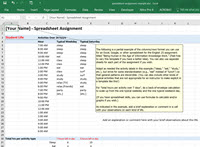
Adapt as needed the activity labels in this example (“sleep,” “eat,” “study,” etc.), but strive for some standardization (e.g., “eat” instead of “lunch”) so that general patterns are discernible. (You can also include other kinds of typical activities that are not appropriate for an instructor to make explicit in a template like this!)
For “total hours per activity over 7 days”, do a back-of-envelope calculation to scale up from the one typical weekday and the one typical weekend day.
As indicated in the example, add a brief explanation or comment in a cell with your observations on each kind of life.
(If you have spreadsheet skills, you can use formulas to calculate and/or graphs if you wish.)
Help resources for students new to spreadsheets:
- Excel:
- WikiHow, “How to Make a Spreadsheet in Excel” (basic how-two told through screenshots)
- Matthew MacDonald, “Creating Your First Spreadsheet” (chap. 1 from Excel 2013: The Missing Manual)
- Google Spreadsheets:
Note: This assignment used to be normally required in this course. However, during remote instruction due to COVID-19, the assignment has been changed to optional. But it is strongly recommended that you try doing it on your own because the assignment aids in the completion of the upcoming, last essay assignment in the course. (Look ahead to the instructions for Essay 3 below.)
Assignment #3 (due May 24, 11:59pm)
Submission instruction: 4-5 pages of double-spaced text (approx. 1,200-1,800 words, not counting notes, bibliography, and any multimedia material). Submit the essay as a Word document on GauchoSpace here.
Essay content: Write an essay that substantively uses at least one work from the section of the course on “The Postindustrial and Neoliberal age” (e.g., Taylor, Zuboff, Brown, Critical Art Ensemble, Gibson’s Neuromancer) and optionally the spreadsheet you created for the previous optional spreadsheet assignment to explore the question: What does it mean to live a “human” life in the age of informational knowledge work? “Substantively” means that you use some key idea(s) or passage(s) from the work(s) in the course (and optionally your spreadsheet) to help you frame and think through the issues.
See General Guidelines for Writing a Good Essay
See also Intellectual Property & Academic Integrity Guidelines
Optional Assignment (for Week 9)
Part 1 – Text-analysis
What you will need for this exercise:
- Download the Antconc program
- Download the following stopwords list and save it as (or copy it into) a plain-text “.txt” file on your computer: buckley-salton.txt
- A long document or set of documents (up to several hundred if you wish) that you have access to as plain text files (stored as “.txt” files). [See suggestions for sources of texts below]
-
- 1. Download onto your computer the Antconc text-analysis program (available for Mac, Windows, Linux). Antconc comes as a simple executable file that does not need to be “installed.” You just run the file. (Note: if you do not have a computer you can use for this purpose, see your TA or the professor for suggestions of labs available for use on campus and in the English department.)
- Note for Mac Users: When you try to open AntConc, there will be a security message that says the app was prevented from opening. In order to get around this, you need to click the Apple icon, go to System Preferences, then Security & Privacy, and (if you haven’t already) change your preferences to Allow apps downloaded from “App Store and identified developers.” Even if these are your settings, the system will prevent AntConc from opening (it’s not an identified developer), but there will be a caption next to the radio buttons that says something along the lines of “AntConc was prevented from opening” and a button labeled “Open Anyway.” Click Open Anyway, and you shouldn’t have any issues running the application after that.
- 2. Find or create a plain-text (.txt) version of a long literary work or collection of works. Possible sources:
- Thomas Pynchon’s The Crying of Lot 49 in someone’s online version (This is a PDF file from which you will need to copy the text and put it in a plain-text .txt file).
- William Gibson’s Neuromancer in The Cyberpunk Project’s online HTML version. (This is a HTML file from which you will need to copy the text and put it in a plain-text .txt file).
- One of the literary or related collections of works available in plain-text form in this section of Professor Liu’s Digital Humanities Toychest site.
- 3. Study your chosen work(s) with Antconc. Then take “souvenirs” of your explorations with Antconc (hopefully something interesting) that you can show your TA (e.g., screenshots, exports into spreadsheets, etc.). Send your souvenirs to your TA 24 hours before your section; and also bring your souvenirs to section in printed form.
- 1. Download onto your computer the Antconc text-analysis program (available for Mac, Windows, Linux). Antconc comes as a simple executable file that does not need to be “installed.” You just run the file. (Note: if you do not have a computer you can use for this purpose, see your TA or the professor for suggestions of labs available for use on campus and in the English department.)
- Tutorials for Antconc:
- Video and other tutorials on Antconc home page (scroll down to the tutorials)
- Heather Froehlich, “Getting Started with AntConc” (tutorial)
- The Grammar Lab, “Antconc Walk-Through” (tutorial)
- Basic Instructions for using Antconc: (click on thumbnails for larger screenshot images)
- (Step 1) Open either a file or a whole folder of files stored on your computer (must be .txt files).
- (Step 2) Go to “Tool Preferences” to load a stopwords list (and, if you wish, also a comparison “reference” text or texts for use with Antconc’s “keywords” function). See below.

- Instructions for using a “stopwords” list in Antconc (to filter out common words like “the,” “of,” etc.):
- Download the following stopwords list and save it as (or copy it into) a plain-text “txt” file on your computer: buckley-salton.txt
- In AntConc, click on “Tool Preferences” among the tabs at the top. Then follow these steps:
- (Step 1) Select “Word list” preferences
- (Step 2) Choose “Use a stoplist below”
- (Step 3) Open a stoplist file (“Add words from a file” > “”Open)
- Choose the buckley-salton.txt file on your computer
- (Step 4) Then press “Apply” at the bottom.

- Instructions for loading a “reference” comparison file(s) for use with Antconc’s “Keywords” function (to see what words are most unique in a text, or have most “keyness,” compared with the reference files):
- Have available a reference comparison file, or multiple files on your computer (must be plain-text “txt” files)
- In AntConc, click on “Tool Preferences” among the tabs at the top. Then follow these steps:
- (Step 1) Select “Keyword list” preferences
- (Step 2) Click on “Add files” to choose the reference comparison file(s)
- (Step 3) Click on “Load” to actually load the reference comparison file(s)
- (Step 4) Click on “Apply”

- Now you can start exploring the document file(s) you chose for study using Antconc. The best way to start is to count all the words in the document(s):
- (Step 1) Choose the “Word List” tab at the top
- (Step 2) Click on “Start” to generate a list of all words found in your document(s), ranked by frequency of occurrence.


Part 2 – Short Commentary (1-2 pages of double-spaced text).
Write a short commentary in which you use your explorations of your literary work(s) with Antconc to note aspects of the work that came to light through text analysis and that could lead a scholar to pursue possible future directions/topics of research.
Final Exam (M., June 9)
General Instructions & Description:
The final exam will be taken by students in online form through the course GauchoSpace site here. The exam is designed to be 50 minutes long, but students will have a 60 minutes between starting the exam and submitting it (to allow for any delays or technical problems in the online test-taking process). The window of time during which students can start the timed, 60-minute exam will open at 8:00 a.m. and close at 8:00 p.m. Pacific Daylight Time on June 9th. (Clarification on timing of exam: The exam may be opened anytime between 8 a.m. and 8 p.m. Students who open the exam at 8 p.m. will still have 60 minutes to complete it before submitting it or having GauchoSpace automatically submit it for them at 9 p.m. If you open the exam after 8 p.m., however, you will not have the full 60 minutes before the exam automatically closes at 9 p.m.) (Note: Special time affordances will be established for DSP students.)
The final exam covers materials in the course since the midterm. (Important: the final exam is not cumulative. Only readings and lectures after the midterm are covered in it.) Like the midterm, the final exam is more or less “factual” or “objective.” It is designed to see if students recognize and comprehend key ideas, specifics, and other material in the readings. It will also include some questions specific to material or comments the professor presented in lecture (i.e., “you had to be there” or have seen the lecture recording). The exam is designed to reward students who regularly keep up with readings and lectures.
Specific Instructions & Descriptions:
- [The instructions for the exam are the same as for the Midterm. See under the Midterm above.]
- Policy for referring to readings and notes for the exam:
- English 25 exams are mostly “factual” and “objective” because they are designed to assess whether students have been keeping up with the readings and lectures. They were not originally designed for open-notes and open-readings exam-taking, which would require many more “thinking” questions that ask students to synthesize, analyze, and evaluate the materials.
- However, because there is no proctoring in the current situation, there is no way for the professor and the TAs to enforce a no-open-notes practice (except indirectly because the nature of many questions and the number of them constrain the use of notes to a diminishing return).
- Therefore, to be clear and realistic about exam policy and also to alleviate ambiguity about what counts as “academic integrity” in taking the exam, the policy for English 25 exams will be that it is fine for students to look at the readings and their notes during the exam.
- However, students should plan on sparingly and only occasionally referring to the readings and notes. The exam is constructed in such a way that it is unrealistic and counter-productive to try frantically to research all the materials during the time allotment of 60 minutes. It would be foolish to expect to do well on the exam without having kept up with the readings and lectures and studying them.
- See Intellectual Property & Academic Integrity Guidelines
- Janet Douglas, Instructional Program Assistant for the English Dept. (SH 3431), is assisting with DSP arrangements.
Participation in Section Activities |
