
Assignments for English 25 (S 2025)
Literature and the Information, Media, & Communication Revolutions
Required Ungraded Assignments
Online Readings System | Spreadsheet | Text Analysis
Graded Assignments
Exams
Section
Ungraded Assignment A (for Week 2) (due in your section meeting)
 Create your system for working with online readings.
Because so many of the readings in this course are online, students must develop an organized system for annotating and saving copies of online materials according to one of the methods described in Prof. Liu’s “Guide to Downloading and Managing Online Readings.” If you do not already have a systematic way to do this, start by saving and annotating two of the assigned readings for Week 1 of the course (originally PDFs) plus at least one of the readings for Week 2 that was originally a Web page. These are readings that you should download, store in an organized manner, and highlight or annotate.
 For your section meeting this week, bring on your laptop or other digital device copies of these readings. If you do not own a laptop, tablet, or other portable digital device, then bring a printed copy of one reading that you have highlighed or annotated.
Essay #1 (due Apr. 25, 11:59pm)
Essay 1: The Future of Media, Communication, Information
Essay Prompt
4 pages of double-spaced text (approx. 1,200 words, not counting notes, bibliography, and any images or other multimedia material)
Put yourself imaginatively in the year 2060 — when many of you will have adult children and even grandchildren. (This is a “near future” far enough ahead to get a generation or two beyond today’s trends, but not so far ahead as to inspire pure science fiction). Write an essay that draws on what you have learned about the prehistorical, historical, and modern development of media, communication, and information (including computing and the Internet) to give a prediction about media, communication, and (or) information in 2060. (Note: In choosing your specific focus or example, you can if you wish focus on the future of “old” media instead of new media–e.g., the future of orality, the future of the book, etc.)
Two variants of this essay you can choose:
Fiction ChallengeBesides writing in a descriptive/analytical mode (e.g., “In the year 2060, information and communication devices will change in this major way …”), you can choose to write in a “fictional” or POV (1st or 3rd-person “point of view”) mode (e.g., “Jane woke up early and turned to her personal artificial-intelligence assistant …”). |
|
| Because it is difficult in fictional or eyewitness point-of-view form to refer directly to “what you have learned about the prehistorical, historical, and modern development of media, communication, and information” (as instructed in the essay prompt above), be sure to add notes along the way of your piece that point out parallels to ideas in works we have read and provide references of the sort: “See work X …,” “Compare this with work y …,” “Here I am inspired by author Z’s idea …,” and so on. These notes should include citations. |
AI ChallengeStudents interested in pushing the limits of generative AI in a way suited to the themes of this course can write a version of this essay that (a) makes AI part of the topic of the essay, (b) uses AI substantially to write the essay but in ways that still allow the student to contribute their own control, thought, and creativity, (c) and acknowledges how they used AI. For three kinds of AI-essays you can write, and also instructions for proposing your own, see "AI Challenges for English 25." (But also see Prof. Liu's rules for appropriate use of AI in his "Intellectual Property and Academic Integrity Guidelines.") |
|
 |
Image created by ChatGPT 4o with the prompt: "Create an image representing a neural network in generative AI as it is activated and changes weights guided by gradient descent to output a fragment of text about whether AGI is possible. Use subtle colors, textures, and designs in the image. Use images from the human craft of artisanal weaving to influence the visualization of the neural network." (Prompt by Alan Liu, March 27, 2025) |
Your essay will be graded based on a combination of the following criteria:
- Whether you draw on ideas related to the past and present of media, communication, and information that you have read about in the course. (If you do not refer to reading materials from the course in your explicit argument, add notes and links for the purpose).
- Balance between the specific and the general. (It’s a good idea to look at something specific as your case, but then also generalize from it in larger or different contexts.)
- Quality of your insight or vision.
- Cohesiveness and effectiveness of your argument (including organizational cohesiveness).
- Writing quality.
- And appropriate (but not excessive) links, images or other multimedia, and any other material useful in illustrating or exemplifying your thesis.
For citation style, use MLA style (or another style, so long as you are consistent).
See Prof. Liu’s” Guidelines for Writing a Good Essay”
See also the course’s “Intellectual Property & Academic Integrity Guidelines”
Essay Submission Instructions
Submit Essay 1 as a Word document on Canvas here.
(If you created your document in Google Docs, “download” it in Word format for submission.)
Midterm Exam (M., May 5)
Midterm Exam (50-minute exam in class)Exam on readings in the course to date. The exam is more or less “factual” or “objective.” It is designed to see if students have done the assigned readings and recognize and comprehend key ideas, specifics, and other material. It will also reward students who regularly attend lectures by including some questions specific to material or comments the professor presented in lecture (i.e., “you had to be there”).
- There will be four sections of the exam:
- Short-answer Questions — Short-answer questions will ask you to write a sentence or two about key readings, concepts, characters, etc. (or sometimes just to fill in a blank with a word or phrase). An example of a question asking for an answer of no more than a couple of sentences or so might be: “According to Plato’s Phaedrus, Socrates did not think very highly of writing. Briefly explain at least one main reason why, being as specific as you can.”
- Multiple-choice Questions
- Identification Questions — Identification questions will ask you to identify authors of key or representative passages in works. Full credit will be awarded for the full name of an author, correctly spelled (middle initials not required). One point off for being able to give the last name only. (Note: this rule obviously does not apply in the case of any authors known only by a single name.)
- Bonus section for extra credit (multiple-choice format) — Multiple-choice questions in this section will be based on the professor’s lectures. (E.g., “In explaining [a particular idea], the professor did A, B, C, or D.”)
- Works that will not be the basis of identification questions are listed below. (These works are histories, surveys, technical guides, and similar material, and thus not memorable for their own sake.) However, the major events, concepts, facts, etc. that these works cover–especially if emphasized in the professor’s lectures–are fair game for short-answer or multiple-choice questions:
- Paul E. Ceruzzi, A History of Modern Computing
- Martin Campbell-Kelly and William Aspray, Computer: A History of the Information Machine
- Richard T. Griffiths, “From ARPANET to World Wide Web”
- W3C Schools, HTML Tutorial
- (Students do not need to bring exam “bluebooks.” But please bring a pen.)
Essay #2 (due May 12, 11:59pm)
Essay 2: Thomas Pynchon’s The Crying of Lot 49.Essay Prompt
4 pages of double-spaced text (approx. 1,200 words, not counting notes, bibliography, and any images or other multimedia material)
Write an essay on The Crying of Lot 49 in which you use at least one reading from earlier in the course (e.g., Marshall McLuhan, Walter Ong, Plato, Alberto Manguel, Claude Shannon, Warren Weaver, Vannevar Bush, Lev Manovitch, or others) to show how we can gain a deeper, richer understanding of some key aspect, idea, character, action, or stylistic/formal feature of Thomas Pynchon’s novel.
AI variant of this essay you can choose:
AI ChallengeStudents interested in pushing the limits of generative AI in a way suited to the themes of this course can write a version of this essay that (a) makes AI part of the topic of the essay, (b) uses AI substantially to write the essay but in ways that still allow the student to contribute their own control, thought, and creativity, (c) and acknowledges how they used AI. For three kinds of AI-essays you can write, and also instructions for proposing your own, see "AI Challenges for English 25." (But also see Prof. Liu's rules for appropriate use of AI in his "Intellectual Property and Academic Integrity Guidelines.") |
|
|
Image created by ChatGPT 4o with the prompt: "Create an image representing a neural network in generative AI as it is activated and changes weights guided by gradient descent to output a fragment of text about whether AGI is possible. Use subtle colors, textures, and designs in the image. Use images from the human craft of artisanal weaving to influence the visualization of the neural network." (Prompt by Alan Liu, March 27, 2025) |
See Prof. Liu’s” Guidelines for Writing a Good Essay”
See also the course’s “Intellectual Property & Academic Integrity Guidelines”
Essay Submission Instructions
Submit Essay 2 as a Word document on Canvas here.
(If you created your document in Google Docs, “download” it in Word format for submission.)
Ungraded Assignment B (for Week 8) (due before your section meeting)
Create a spreadsheet on being human in the age of knowledge work.
(Note: while this is an ungraded assignment, your next graded essay will need to draw on this spreadsheet.)
Using a spreadsheet program (e.g., Excel or Google Sheets), create a spreadsheet (or set of sheets) that compares the lives of the following three people:
- (A) The life of a typical college student at UCSB. (If you model your student after yourself or someone you actually know, please do not identify anyone by name for reasons of privacy.)
- (B) The life you think you will have in the future as a career worker, professional, or other role in the field of your choice. (If you have not yet decided on your dream career, profession, or role in society, please choose a possible one you could see yourself pursuing.)
- (C) Case’s life while “working” in his role as the hero of William Gibson’s Neuromancer (based on your deduction about what his life is like).
The following is a partial example of the columns/rows format you can use for an Excel, Google, or other spreadsheet for this English 25 assignment on “being human in the age of information knowledge work”: download Excel spreadsheet  or Google sheet
  . Feel free to vary this template if you have a better idea. (Optional: if you wish to be extra creative, make additional sheets in your spreadsheet to provide context or to dream of a better life. See this expanded Excel spreadsheet or expanded Google sheet with additional sheets for “All Career Workers” and “What If”)
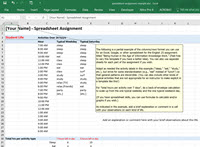
Adapt as needed the activity labels in the example spreadsheets (“sleep,” “eat,” “study,” and so on), but strive for some standardization (e.g., “eat” instead of “lunch”) so that general patterns are discernible. (You can also include other kinds of typical activities that are not appropriate for an instructor to make explicit in a template like this!)
For “total hours per activity over 7 days”, do a back-of-envelope calculation to scale up from the one typical weekday and the one typical weekend day.
As indicated in the example, add a brief explanation or comment in a cell with your observations on each kind of life.
(If you have spreadsheet skills, you can use formulas to calculate and/or create graphs if you wish.)
Help resources for students new to spreadsheets:
- Excel:
- WikiHow, “How to Make a Spreadsheet in Excel” (basic how-two told through screenshots)
- Matthew MacDonald, “Creating Your First Spreadsheet” (chap. 1 from Excel 2013: The Missing Manual)
- Google Sheets:
- Google, Help page for Google Sheets
Submission instructions: Submit your spreadsheet on Canvas here in any file format or as a link to an online file or online spreadsheet.
- If you are exporting from a spreadsheet to a format like PDF, please first select the portion of your spreadsheet to export so that you do not include all the unused columns and rows. (Instructions for setting a print area [or print-to-PDF area]: Excel | Google Sheets.)
- If you are submitting a link to an online spreadsheet or file, please be sure to share it with “commenter” permissions for your TA.
Essay #3 (due May 30, 11:59pm)
Essay 3: Being Human in the Age of Knowledge Work.Essay Prompt
4 pages of double-spaced text (approx. 1,200 words, not counting notes, bibliography, and any images or other multimedia material)
After you have finished creating your spreadsheet comparison of student life with work life (see the required ungraded assignment for previous week), write an essay that substantively uses both the spreadsheet and at least one work from the section of this course on “The Postindustrial and Neoliberal age” (e.g., Gibson’s Neuromancer and/or one of the works byTaylor, Zuboff, Brown, Critical Art Ensemble, or others) to explore the question: What does it mean to live a “human” life in the age of informational knowledge work? “Substantively” means that you use some key features of your spreadsheet and some key ideas or passages from the works in the course to help you frame and think through the issues. (To cite your spreadsheet when you refer to it, add a note with the name of your spreadsheet and any range of cells you are referring to [e.g., cells A3:A12], along with a link to the spreadsheet if it is online.)
Important: A key to writing on this topic is not to assume that there is an abstract, universal, essential, or timeless state of being “human” that goes without saying. Being aware of how earlier or different societies have understood “human” might help you think through some of the specific ways in which our time and our culture are inflecting the idea of “human,” and why.
AI variant of this essay you can choose:
AI ChallengeStudents interested in pushing the limits of generative AI in a way suited to the themes of this course can write a version of this essay that (a) makes AI part of the topic of the essay, (b) uses AI substantially to write the essay but in ways that still allow the student to contribute their own control, thought, and creativity, (c) and acknowledges how they used AI. For three kinds of AI-essays you can write, and also instructions for proposing your own, see "AI Challenges for English 25." (But also see Prof. Liu's rules for appropriate use of AI in his "Intellectual Property and Academic Integrity Guidelines.") |
|
|
Image created by ChatGPT 4o with the prompt: "Create an image representing a neural network in generative AI as it is activated and changes weights guided by gradient descent to output a fragment of text about whether AGI is possible. Use subtle colors, textures, and designs in the image. Use images from the human craft of artisanal weaving to influence the visualization of the neural network." (Prompt by Alan Liu, March 27, 2025) |
See Prof. Liu’s” Guidelines for Writing a Good Essay”
See also the course’s “Intellectual Property & Academic Integrity Guidelines”
Essay Submission Instructions
Submit Essay 3 as a Word document on Canvas here.
(If you created your document in Google Docs, “download” it in Word format for submission.)
Ungraded Assignment C (for Week 10) (due by your section meeting)
Text Analysis Exercise (with short commentary)
What you will need for this exercise:
- Antconc program (download)
- Alternatively, you can use Voyant Tools or an AI large language model as your tool. (See mentions of these below)
- A stopwords list (download the following stopwords list and save it as a plain-text “.txt” file on your computer: buckley-salton.txt)
- A long document or set of documents (up to several hundred documents if you wish) that you have access to as plain text files (stored as “.txt” files).
- Alan keeps a set of demo text corpora on his DH Toychest site here. These include, for example, a variety of ready-to-go text files (usually downloadable in .zip files) and links to online repositories of texts such as Project Gutenberg.
- There are also online text versions of the novels assigned in English 25 in case students wish to work with those:
- Thomas Pynchon’s The Crying of Lot 49 in someone’s online version (This is a PDF file from which you will need to copy the text and put it in a plain-text .txt file).
- William Gibson’s Neuromancer in The Cyberpunk Project’s online HTML version. (This is a HTML file from which you will need to copy the text and put it in a plain-text .txt file)
Instructions for this exercise:
-
- Download and install onto your computer the Antconc text-analysis program (available for Mac, Windows, Linux). The current version of the program is 4.x.
- Note for Mac Users: When you try to open AntConc, there may be a security message that says the app was prevented from opening. In order to get around this, you need to click the Apple icon, go to System Preferences, then Security & Privacy, and (if you haven’t already) change your preferences to Allow apps downloaded from “App Store and identified developers.” Even if these are your settings, the system will prevent AntConc from opening (it’s not an identified developer), but there will be a caption next to the radio buttons that says something along the lines of “AntConc was prevented from opening” and a button labeled “Open Anyway.” Click Open Anyway, and you shouldn’t have any issues running the application after that.
Note: If you have trouble getting AntConc to work (e.g., on a Mac) and cannot resolve the issues, then you may want to try a different well-known program that runs wholly through a browser online: Voyant Tools. On the Voyant Tools site, you can upload your own files for analysis. Or you can experiment with two corpora of demo text files (by Shakespeare or Austen). (Click “Open” on the home screen to access the demo files).

Screenshot of Voyant Tools Voyant Tools includes a whole suite of tools presented in a “dashboard” style, each of whose panes can be set for a different tool. Tools relevant to this practicum (analogous to those in AntConc) include “Corpus Terms,” “Corpus Collocates,” “Phrases,” etc. See the Voyant Tools Help page for guides to each tool.
 Configuration bar in each of Voyant Tools’s panes. Click on the icon that the cursor is pointing to here to open a menu of tools.
 - Find or create a plain-text (.txt) version of a long literary work or collection of works. Possible sources:
- Thomas Pynchon’s The Crying of Lot 49 in someone’s online version (This is a PDF file from which you will need to copy the text and put it in a plain-text .txt file).
- William Gibson’s Neuromancer in The Cyberpunk Project’s online HTML version. (This is a HTML file from which you will need to copy the text and put it in a plain-text .txt file).
- Prof. Liu keeps a set of demo text corpora on his DH Toychest site here. These include, for example, a variety of ready-to-go text files (usually downloadable in .zip files) and links to online repositories of texts such as Project Gutenberg.
- Laurence Anthony the creator of AntConc, also has a utility tool called AntFileConverter for quickly converting PDF or Word files into plain-text .txt files. (Running the tool on an “input file(s)” will save the converted .txt file in a subfolder called “txt” of the folder in which the input file was located.)
- Study your chosen work(s) with Antconc. For example, look at results under the tabs for “Word” (word frequency list), “N-Gram” (frequeny of consecutive-word phrases), “Cluster” (similar to N-Gram,” but with the option to search for phrases with a word at the beginning or end) “Collocate” (words that co-occur within a defined number of words from each other), and “Keyword” (distinctiveness of particular words in a corpus by comparison with a “reference corpus” that you have optionally loaded in). Then take “souvenirs” of your explorations with Antconc (hopefully something interesting). For example, you can take souvenirs in the form of screenshots, exports of word lists into spreadsheets, etc. You can also use the following two options under Antconc’s “File” options to save data in text-file format (“Save Current Tab Restults”) or zipped .csv file format (“Save Current Tab DataTables”).
- Accompany your souvenirs with a short comment (no more than 300 words total) that explains what you were trying to do, points out anything interesting that you observe, or comments on the method or tool used.
- Download and install onto your computer the Antconc text-analysis program (available for Mac, Windows, Linux). The current version of the program is 4.x.

Help File & Tutorials for Antconc:
- The Help file for the latest version of Antconc can be found on the Antconc home page under “User Support’ > “Latest Help files”.( For example, the help file for Antconc version 4.2.4 is a PDF file here.)
- Video and other tutorials and guides are further down on the Antconc home page (scroll down).
Basic Instructions for Using Antconc:
(click on thumbnails below for larger screenshot images)
(Step 1) Choose text files to make into a “corpus” for your analysis. (You can select multiple files in a folder) (click on image below for larger instructions):

(Step 2) Apply a stopwords list (stoplist) to filter out common words like “the,” “of,” etc.:
- First download the following stopwords list and save it as a plain-text “txt” file on your computer: buckley-salton.txt
- Then in Antconc go to “Global Settings” and follow these steps:

Antconc 4.x – How to set a stopwords list (stoplist) file for words to ignore in an analysis.

(Optional step) You can load a “reference” (i.e., comparison) corpus so you can use Antconc’s “Keyword” function. This function analyzes the “keyness” or distinctiveness of words in the corpus you are studying by comparison with a reference corpus. Instructions:
- First, have available a reference comparison file, or multiple files on your computer (must be plain-text “txt” files)
- Then in AntConc, go to File > “Open Corpus Manager” and follow the instructions in the screenshot below:
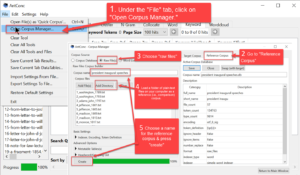
Antconc 4.x – Creating a “reference” (i.e., comparison) corpus to use for Antconc’s “Keyword” function, where “keyness” means how distinctive a word is by comparisin with the reference corpus.

(Final step) Now you can start exploring the document file(s) you chose for study using Antconc. The best way to start is to count all the words in the document(s. Choose the “Word” tab in Antconc, then follow the directions in the screenshot below:

Next, try out the “N-grams,” “clusters,” and “collocates” tabs, selecting a word (or words) to explore for phrases in which they occur (n-grams and clusters) or for words that often co-occur nearby but not necessarily adjacent or consecutively (collocates).
AI Version of Assignment
The AntConc tool is an excellent learning tool for beginners in text analysis (natural language processing) because it is like a Swiss Army knife that one can keep in one’s pocket to use on any text, and also because it provides a good mental grasp on what is happening. But this assignment is not wedded to any particular tool. For example, students with technical skills who are comfortable using the Python or R programming languages to perform natural language processing are free to use scripts in those languages.
Other students who wish to explore how current AI large language models can be used for text analysis can choose to complete this assignment by using a LLM of their choice to conduct the equivalent of the assignment. For example: here are examples of Prof. Liu prompting ChatGPT 4o and Claude 4.0 to text analyze a plain text version of Thomas Pychon’s The Crying of Lot 49.
-
Input Materials for the AI:
- Thomas Pynchon’s The Crying of Lot 49 ( PDF) (Note: a HTML version of William Gibson’s Neuromancer is also available online.)
- Stopwords list
-
AI Outputs:
- ChatGPT session that attaches the text of the novel and also a stopwords list to prompt for a text analysis.
- Interface created by a Claude 4.0 session that uses the text of the novel and a stopwords list to create an interactive interface for exploring words, phrase, and collocates. The original prompt to Claude 4.,0 was as follows. (Multiple debugging iterations were needed to produce a working result.)
Original prompt to Claude 4.0: Conduct a text analysis of the attached text of Thomas Pynchon’s Crying of Lot 49 novel (filename “crying-of-lot-49.txt”) in which (after applying the attached stopwords list, filename “Buckley_Salton_1971.txt”) you create a visually appealing, interactive interface for exploring ranked lists of the novel’s most common words, bigrams, and trigrams; and also ranked lists of the most frequent collocates of specific words that the user chooses.
Note: Your ability to create ueelful results with LLMs may vary depending on your level of access. Paid subscriptions to LLMs, for example, typically allow for more repetitions and iterations of of prompting in a single session.
Final Exam (M, June 9, 4:00-4:50 pm)
Final Exam (50-minute exam in our lecture room)Exam on materials in the course (print and online) covered since the midterm.
The exam is more or less “factual” or “objective.” It is designed to see if students have done the assigned readings and recognize and comprehend key ideas, specifics, and other material. It will also reward students who regularly attend lectures by including some questions specific to material or comments the professor presented in lecture (i.e., “you had to be there”).
- The format of the final exam is the same as that for the earlier midterm. There will be four sections of the exam:
- Short-answer — Questions will ask you to fill in the blank or write a a sentence or two about key concepts, characters, names, etc.
- Multiple-choice
- Identification — Questions will ask you to identify authors of key or representative passages in works. Full credit will be awarded for the full name of an author, correctly spelled (middle initials not required). One point off for being able to give the last name only. (Note: this rule obviously does not apply in the case of any authors known only by a single name.)
 The following works will not be used for identification questions (though their main ideas may be the subject of short-answer and multiple choice questions:
- Joseph H. Boyett and Henry P. Conn, Workplace 2000
- William H. Davidow and Michael S. Malone, The Virtual Corporation
- Wikipedia, “Markup Language”
- Alan Liu, “Transcendental Data: Toward a Cultural History and Aesthetics of the New Encoded Discourse”
- Bonus section for extra credit (multiple-choice format) — Questions will be based on the professor’s lectures. (E.g., “In explaining [a particular idea], the professor did A, B, C, or D.”)
- (Students do not need to bring with them exam “bluebooks,” but bring a pen.)
Section Grade (Participation in Section Activities) |
